\u003Cbr/> Without a proper GPU, processing times for just a minute of SD video can be tens of hours or more. Furthermore, local installation is usually limited to processing one video at the time, per GPU. This isn't efficient if you want to enhance a large video archive."}},{"@type":"Question","name":"How does your tool compare to Topaz Labs?","acceptedAnswer":{"@type":"Answer","text":"The biggest difference is that Topaz Labs is an offline software that you install on your computer, while TensorPix can be used through web browser.\u003Cbr/>\u003Cbr/> Because Topaz runs on your PC, it uses your hardware to process files. This becomes problematic if your PC isn't quite high-end (and most users don't have high-end computers). You can still use Topaz with a less powerful computer, but the processing speed will be heavily impaired, meaning you could wait for tens of hours for enhancing a mere couple of seconds of video. \u003Cbr/>\u003Cbr/>On the other side, TensorPix sends all processing to cloud which has access to powerful GPU hardware. This way, every TensorPix user has access to high-end hardware and doesn't have to worry about their computer being too slow. \u003Cbr>\u003C/br> Using cloud resources has another benefit. Cloud resources can be easily scaled meaning you can process multiple videos/images at once, without worrying if your computer can handle it. You can't do that with Topaz as processing ONE video or image will utilize nearly 100% of your computer’s processing power."}},{"@type":"Question","name":"How much of a quality improvement can I expect?","acceptedAnswer":{"@type":"Answer","text":"The rule of thumb is - the better the quality aspect you're trying to fix in the source, the better the enhancement. E.g. if the source has severe compresssion artifacts that obscure a lot of details, it's hard to expect much improvement. \u003Cbr/>\u003Cbr/> However, if the source only has moderate or low artifacting, the end result would be much better as it's easier to fix minor artifacts than heavy ones. The best thing is try enhancing a sample and see how it turns out (this is why we have \u003Cb>Free Previews\u003C/b> for videos)."}},{"@type":"Question","name":"How fast is the enhancing process?","acceptedAnswer":{"@type":"Answer","text":"While the processing speed largely depends on the input file parameters such as resolution, framerate, and duration, you can expect the following: \u003Cbr> A minute of SD video will take 5-10 minutes to enhance.\u003Cbr/> A single 2000x2000 image will process within few seconds"}},{"@type":"Question","name":"Do you claim any copyrights on the uploaded or enhanced videos or images?","acceptedAnswer":{"@type":"Answer","text":"We don't claim any copyrights on uploaded or on enhanced videos and images. You can delete your files at any time. When you delete a file, we completely delete it from our servers."}},{"@type":"Question","name":"Is my data safe and who can see my data?","acceptedAnswer":{"@type":"Answer","text":"We have implemented rigorous technical and organizational security policies to protect your data. This includes, but it's not limited to: \u003Cul class='list-disc my-4 pl-8'> \u003Cli>Using military grade 256-bit AES encryption algorithm for all data stored on our servers\u003C/li> \u003Cli>Using long and random passwords for all access points\u003C/li> \u003Cli>Using 2 Factor Authentication where applicable\u003C/li> \u003Cli>Hashing all user account passwords\u003C/li> \u003Cli>Regularly updating all our systems in order to avoid software exploits and hacks\u003C/li> \u003Cli>Always giving users an option to delete ALL their data\u003C/li> \u003Cli>Automatically deleting any unnecessary data such as temporary files\u003C/li> \u003Cli>Restricting user data access to minimum number of authorized personel\u003C/li> \u003Cli>Educating all employees about best security and privacy practices\u003C/li> \u003C/ul> Your data is never intentionally shared with other entities inside, or outside of our organization."}},{"@type":"Question","name":"What Makes AI Enhancement Better Than Regular Video Editing?","acceptedAnswer":{"@type":"Answer","text":"AI enhancement is automatic and smart - you don't need to learn complicated editing software or spend hours adjusting settings. Traditional video editing requires technical knowledge and lots of manual work. AI enhancement uses intelligent algorithms that know exactly what improvements to make based on millions of examples. Just upload and wait - the AI handles everything automatically and usually produces better results than manual editing, especially for quality improvements."}},{"@type":"Question","name":"Do you train your AI models on user data?","acceptedAnswer":{"@type":"Answer","text":"No, our policy is not to use user data for training our AI models. We only use publicly available datasets and our own data to train the models. This means that your videos and images are not used to improve our AI, ensuring your privacy and security."}},{"@type":"Question","name":"What is Video Upscaling and How Does It Work?","acceptedAnswer":{"@type":"Answer","text":"Video upscaling is an advanced image processing technique that uses artificial intelligence to increase video resolution while preserving and enhancing visual quality. Our AI-powered video enhancement technology analyzes each frame using deep learning algorithms, intelligently filling in missing pixel data to transform low-resolution footage into crisp, high-definition content. The process reconstructs fine details, reduces compression artifacts, and sharpens edges to deliver professional-grade video quality enhancement."}},{"@type":"Question","name":"Who uses online video upscalers?","acceptedAnswer":{"@type":"Answer","text":"Video upscaling technology serves diverse professionals and content creators:\u003Cbr>\u003Cbr> Content Creators & YouTubers use video enhancement tools to improve their archive footage and boost viewer engagement with crystal-clear visuals.\u003Cbr>Digital Marketers & Agencies rely on AI upscaling to refresh older promotional videos for modern high-resolution displays and social media platforms.\u003Cbr>Film Restoration Specialists utilize advanced upscaling algorithms to digitally remaster classic movies, documentaries, and historical footage.\u003Cbr>E-learning Professionals enhance educational videos to ensure optimal viewing experiences across all devices and screen sizes.\u003Cbr>Social Media Managers upscale user-generated content and older brand videos to maintain consistent visual quality standards.\u003Cbr>Surveillance & Security Teams improve low-quality security footage for better identification and evidence analysis.\u003Cbr>"}},{"@type":"Question","name":"What is Video Upscaling Used For?","acceptedAnswer":{"@type":"Answer","text":"Video upscaling serves multiple essential purposes in modern digital media:\u003Cbr> Resolution Enhancement: transforms standard definition (SD) videos into high-definition (HD), Full HD (1080p), or even 4K ultra-high-definition formats.\u003Cbr> Legacy Content Modernization: breathes new life into older video archives, making them suitable for contemporary viewing standards and devices. \u003Cbr>Quality Improvement: eliminates pixelation, blurriness, and compression artifacts that degrade viewer experience. \u003Cbr>Platform Optimization: ensures videos meet quality requirements for streaming platforms, social media channels, and professional presentations.\u003Cbr> Production Value Enhancement: helps small businesses and independent creators achieve professional-looking results without expensive re-shooting.\u003Cbr>"}},{"@type":"Question","name":"How to Upscale Video for Free?","acceptedAnswer":{"@type":"Answer","text":"With TensorPix, you can enhance approximately up to 5 minutes of video."}},{"@type":"Question","name":"Can I use the AI Video Upscaler on my phone?","acceptedAnswer":{"@type":"Answer","text":"Absolutely. TensorPix is mobile-friendly and works in your browser—no app needed. Since all processing happens in the cloud, your phone doesn't need to be powerful to get great results. iPhone, Android, iPad - they all work great. You can enhance videos directly from any device with internet connection."}},{"@type":"Question","name":"Is AI video upscaling better than traditional restoration?","acceptedAnswer":{"@type":"Answer","text":"AI video upscaling uses trained neural networks to recover missing details—something traditional editors can’t do. It's faster, smarter, and produces more realistic enhancements."}}]}

成人午夜性一级毛片_69堂国产欧美亚洲_5858成人免费A片_欧美香蕉视频在线观看_就爱av啪啪啪av_日本中文在线激情91_精品中文无码三级_班长解开乳罩胸又大又软_国产成人无码αV在线播放_91亚洲精品一区二区三区

Online Video & Image Quality Enhancer

We use AI to enhance and upscale video & image quality

Start for Free
No credit card required

No Installation.
Get results within 3 minutes.

Trusted by 2M+ users:

BBC logoAdobe logoAssociated Press logoCambridge university logoLoreal logoCERN logo
product icon

AI Video Quality Enhancer

Upscale videos up to 4K and enhance overall quality. 100% online and easy to use.

Enhance Videos
product icon

AI Image Enhancer & Upscaler

Upsize images and enhance photo quality with AI. All from your web browser.

Upscale Images
product icon

Online Video Compressor

Reduce video file size without compromising quality. Save disk space, send, and upload videos faster.

Compress Videos
product icon

4K AI Video Generator

Turn your ideas into 4K videos from text and image inputs using simple prompts. No technical expertise needed.
Explore Now
product icon

Upscale and Enhance API

Add Video & Image Enhancing into your app or product via API Integration.

Tell me More
product icon

AI Image Generator

Generate photos, artwork, illustrations from text descriptions in 4K. Edit images with simple prompts.

Generate Now

Used and loved by many professionals

product review author profile picture
Georgi Banchev

I've been using the program for couple of months and I am truly amazed from the results. Among other webpages or programs, the results of my videos are impeccable. Amazing Job, keep it up guys and Thank you for everything!!!

icon of 5 star reviewReview from Trustpilot
product review author profile picture
Tanya Ariana Bendis

I have used the color restore and AI stabilization on a few dance videos for social media and I am really happy with the results, I uploaded 4K video so it takes a bit of time, but I like that they send me an email and enhance in the background so that I don't have to wait around.

icon of 5 star reviewReview from Trustpilot
product review author profile picture
Zeng Chao
FX Artist at Ants Animation Studios

It’s a great tool for increasing resolution and upscaling, especially for those without the necessary hardware. Since AI training and model usage can be prohibitively expensive for most, packaged online tools like TensorPix Enterprise offer a cost-effective and accessible solution. It’s a great option for anyone looking for a simple and straightforward way to use AI video enhancers without prior experience!

icon of 5 star reviewReview from LinkedIn

What you can do with TensorPix:

pixelated icon

Generate 4K 60 FPS videos with ease

Generate high-quality AI videos in multiple resolutions - from 480p up to crystal-clear 2K and 4K quality.

Our 4K video generator uses advanced AI to produce ultra high-definition videos that look amazing on any screen. Generate 4K AI video content that stands out with exceptional clarity and visual impact.

Vertical pixelated bar
pixelated icon

See old Videos and Photos like never before

Enhance and upscale old VHS, 8mm, flip phone and early digital cameras footage with ease.

Be amazed with the amount of details you have never seen. Be nostalgic but in 1080p.

Vertical pixelated bar
Original image of lower quality that is on the left side of the slider.
Enhanced and upscaled image of high quality that is on the right side of the slider.
Before
After
pixelated icon

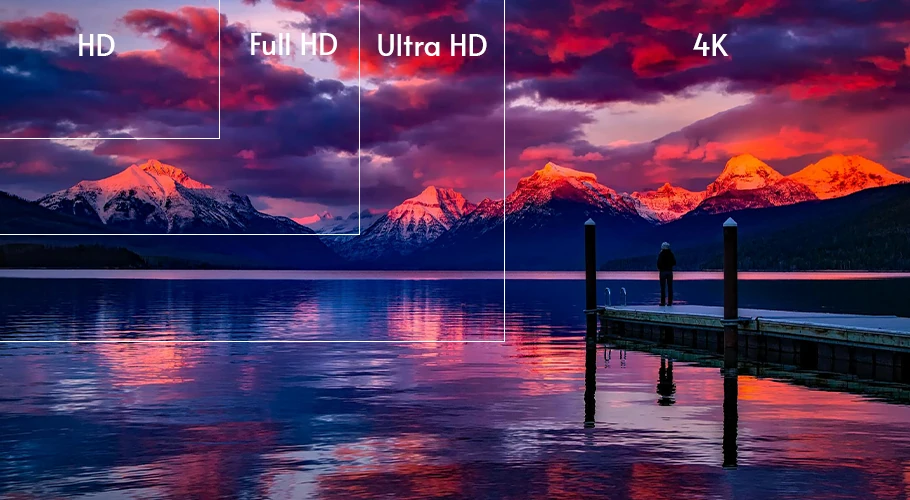
Meet the latest quality standards with any video

1080p, 2K, 4K, 60FPS. You name the standard, we can enhance it to match the standard.

Upscale and enhance old SD footage to new Full HD and 4K standards without creating blurry details. Get the most out of your archive in a few clicks.

Vertical pixelated bar
pixelated icon

Stop wasting time searching for a perfect image

Instead, generate images of anything you can put to words. Shark driving a car, life on mars, grandma selling cookies to a US president… Your creativity is the limit.

Our AI Image generator can replace stock photo searches. First generate, then upscale to 4K, and remove background if needed.

Vertical pixelated bar
shark on top of a bus
pixelated icon

Video & Image Upscaling API

Your clients deserve the best of the best. Give them an option to enhance and upscale videos and images to top notch quality.

Integrate TensorPix products into your app with our REST API. Your users will thank you.

Vertical pixelated bar
illustration depicting integration into other products
pixelated icon

Forget about low quality video calls

We get it, most web cameras suck. They produce low-quality, blurry, and poorly lit videos.

Not anymore. Run the video call recording through TensorPix and get ultra crisp and clean videos under 3 minutes.

Vertical pixelated bar

FAQ

Do you have a version that I can install on my computer and run locally?

expand icon

How does your tool compare to Topaz Labs?

expand icon

How much of a quality improvement can I expect?

expand icon

How fast is the enhancing process?

expand icon

Do you claim any copyrights on the uploaded or enhanced videos or images?

expand icon

Is my data safe and who can see my data?

expand icon

What Makes AI Enhancement Better Than Regular Video Editing?

expand icon

Do you train your AI models on user data?

expand icon

What is Video Upscaling and How Does It Work?

expand icon

Who uses online video upscalers?

expand icon

What is Video Upscaling Used For?

expand icon

How to Upscale Video for Free?

expand icon

Can I use the AI Video Upscaler on my phone?

expand icon

Is AI video upscaling better than traditional restoration?

expand icon

Check out more use cases:

Photo demonstrating a use case

Enhance Video Chat Recordings

Forget noisy, blurry and low resolution video calls. Create high quality webcam recordings with any laptop camera.

Photo demonstrating a use case

Meet Latest Quality Standards

Convert any SD footage to HD or even 4K. Prepare your images and videos for the newest displays and TVs.

Photo demonstrating a use case

Upscale & Enhance Old Videos and Images

Restore details and remove artifacts, blur and noise. Make your old videos and images look like new.

Photo demonstrating a use case

Interpolate low FPS videos with AI

Goodbye choppy, low-quality video playback. Transform low FPS videos into 60 FPS, silky smooth footage

Photo demonstrating a use case

Unblur Videos Online

Turn blurry footage into stunning clarity with our AI technology. Enhance every detail of your video, from action shots to personal memories, effortlessly and affordably.

Photo demonstrating a use case

Stabilize Shaky Videos

Convert shaky footage into smooth, professional-quality video. Eliminate camera wobble and achieve consistently clear results.

Photo demonstrating a use case

Denoise Videos

Remove various forms of noise from videos. Perfect for noisy night shots or low-light videos.

Photo demonstrating a use case

Upscale and Enhance AI Generated videos

Enhance AI Video quality in less than 3 minutes. Upscale up to 4K and make your videos stand out among others.

pixelated vertical bars illustration
PhotoPhoto
PhotoPhoto
Step into the future of video & image enhancing

Ready to elevate your content?

vertical blue bars illustration